Aimbot & Advanced Smoothing
OW2 aimbot includes activation, a selection radius, head targeting, response time and distance controls. Smoothing speed, sensitivity and an exponential movement mode shape the response. Prediction and lead targeting are separately listed fields, with recoil compensation in the same combat selection.
Player ESP & Wallhack
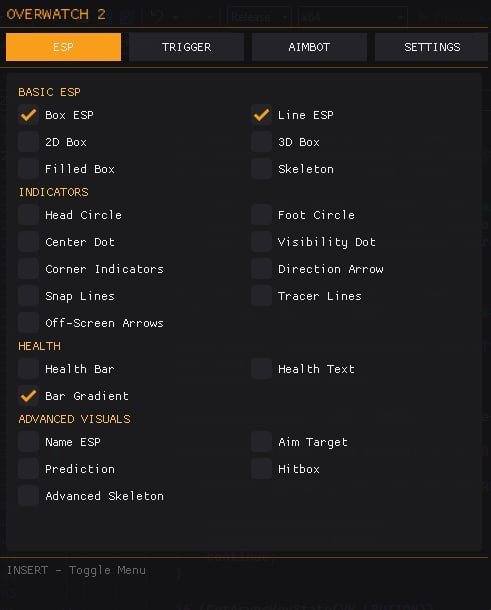
Player visuals include 2D, 3D and filled boxes, skeletons, names and health information. Bar gradients, head and foot circles, visibility dots and hitbox displays extend the overlay. Distance filtering, scaling, alpha, borders and thickness controls provide separate ways to adjust its presentation.
Triggerbot Timing & Selection
Triggerbot has independent activation, FOV, target, maximum distance, shot delay and reaction-time controls. The supplied menu lists SHIFT for its key, a 150-pixel radius and Head target. The examples document that menu rather than a recommended preset for every user or hero.
Off-Screen & Directional Markers
Directional visuals group off-screen arrows, direction arrows, snaplines, tracer lines and corner indicators. Arrow sizing and distance-related controls accompany those markers. They supplement the player overlay; the supplied list does not confirm a separate radar panel, skin changer or automatic per-hero profile system.
Compatibility & Menu Access
Requirements specify Steam, Windows 10/11 x64, listed Windows builds, Intel/AMD processors and windowed or borderless mode. Streamproof is explicitly No. INSERT toggles the menu, and SHIFT is listed for aim and trigger activation. Menu help covers common checks.
Settings, Access & Support
The settings guide explains the aiming, trigger and visual categories. Choosing access covers features, compatibility and current terms. Use ESHub Discord support for specific questions and the risk overview for the limits of status and safety claims.