Jump to content
Having Trouble Paying? Click here to join the Discord, You can pay with Card, Paypal, Cashapp, Venmo, Zelle, Apple Pay! Γ—
πŸ€–ARC Raiders Frozen Trail! | Save 10% on all ARC Raiders products using code: ARC πŸ€– (Click Me) Γ—


  • Overwatch 2 External vs Internal Cheats: Implementation & Product Differences

    Understand external and internal Overwatch 2 cheats. Compare implementation terms, current features, Steam compatibility and recording limitations.

    Browse Overwatch Cheats
  • Featured Products

OVERWATCH 2

Implementation & Product Differences

External and internal describe how third-party software operates in relation to the game process. The selected OW2 product is listed as external. This comparison explains the terminology without presenting an unlisted internal product or assuming either implementation guarantees particular features or protection from bans.

DETAILS & CONTROLS

Overwatch 2 External vs Internal Cheats

The External Selection

An external implementation operates outside the game process rather than loading its main code into that process. The selected product’s external label accompanies aimbot, triggerbot and player ESP. Its actual feature list remains the reference for the available controls; the implementation word alone does not identify the complete menu.

What Internal Means

An internal implementation runs code within the game process. That describes the approach, not a universal set of controls. This pack does not claim an internal OW2 alternative is currently available from ESHub. A specific listing would still need its own platform, launch requirements and feature documentation.

Compare the Actual Features

Review aiming, firing automation, player visuals and prediction controls on the current listing. Similar feature names can expose different settings. Do not infer a radar, skin changer, hero presets or other unlisted feature simply from the implementation category.

Compatibility & Recording Behavior

The current external selection lists Steam, supported Windows builds, Intel/AMD processors and windowed/borderless mode. It explicitly lists streamproof as No. Those are product-specific details. Read requirements rather than assuming an external label establishes recording concealment or support for every launcher.

Make a Product-Based Choice

Neither implementation guarantees protection from detection. Read the risk overview and the selection checklist. Ask ESHub Discord support about an unclear feature or requirement instead of generalizing from the label. The comparison should remain tied to a documented, currently available package.

Explore Related OW2 Features

Read aimbot controls, player ESP and triggerbot settings for the combat and visual selection. The settings guide organizes the menu categories, and compatibility information covers the listed Steam and Windows environment.

Use the current OW2 product listing for the current feature list and ESHub Discord support for a specific product question.

OW2 GAMEPLAY

Overwatch 2 Gameplay Preview

Watch the supplied OW2 gameplay video, then explore the menu, aiming and ESP images below.

Open the gameplay video β†’

MENU & FEATURE PREVIEWS

Explore the OW2 Images

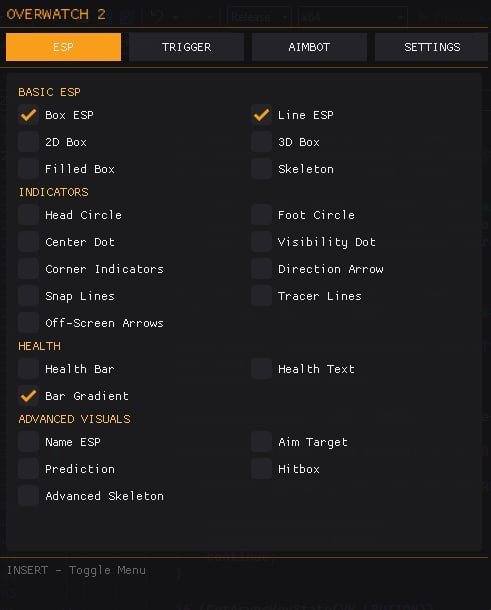
Use the arrows to browse the menu, aimbot and ESP. Click an image to enlarge it.

Overwatch 2 Menu preview
Menu

Questions & Answers

Which implementation is the selected product?

The current listing identifies it as external.

Is an internal OW2 option confirmed here?

No. This page explains the term without claiming another product is available.

Does external mean streamproof?

No. The selected product explicitly lists streamproof as No.

OVERWATCH 2 COLLECTION

Explore All OW2 Pages

Browse aiming and visual features, compatibility, settings and common questions.

Explore Overwatch 2 Cheats

Browse current OW2 access options and the documented aiming, firing and visual features.

Γ—
Γ—
  • Create New...