Aiming Assistance
Aimbot provides target selection and tracking controls. The current menu lists activation, aim radius, head targeting, smoothing, distance limits and response settings. Prediction and lead controls belong to that aiming category. Each setting contributes to a different part of selecting or following the target point.
Firing Automation
Triggerbot is a separate feature with its own activation key, radius, shot delay and reaction time. It concerns automated firing rather than the smooth movement toward an aim point. The two categories can appear together in one menu, but their keys and numerical fields should be read separately.
Player ESP & Directional Information
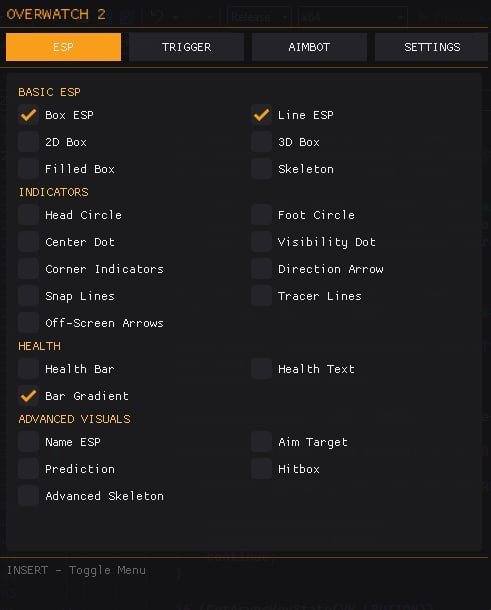
Player ESP adds boxes, skeletons, health and names around tracked players. Directional indicators provide arrows and line-based references. Thickness, borders, distance scaling and colors style the display. These listed visual options do not establish support for unrelated features such as a separate radar panel or skin changer.
Menus & Configuration Controls
The supplied menu lists INSERT for access, SHIFT for aim and trigger activation, and X for team changes. The settings guide organizes the categories and explains example values. Those values describe the supplied menu rather than a universal preset. Review the currently active settings when a behavior seems unexpected.
From Overview to Product Details
Use the current OW2 product listing for the actual feature selection, supported platform and display mode. Read compatibility and choosing OW2 cheats before selecting access. For questions about a specific field or requirement, use ESHub Discord support rather than assuming another tool’s instructions apply.