Jump to content
Having Trouble Paying? Click here to join the Discord, You can pay with Card, Paypal, Cashapp, Venmo, Zelle, Apple Pay! Γ—
πŸ€–ARC Raiders Frozen Trail! | Save 10% on all ARC Raiders products using code: ARC πŸ€– (Click Me) Γ—


  • How to Choose Overwatch 2 Cheats: Features, Compatibility & Support

    Learn how to choose Overwatch 2 cheats by comparing aiming, ESP, triggerbot, platform support, display mode and access details. Explore OW2 pages.

    Browse Overwatch Cheats
  • Featured Products

OVERWATCH 2

Features, Compatibility & Support

Choose Overwatch 2 cheats by comparing the exact controls, supported environment and access details. Broad labels such as aimbot or ESP are a starting point, but they do not explain the target settings, visual categories or launcher requirements. Read the current listing alongside the menu previews.

DETAILS & CONTROLS

How to Choose Overwatch 2 Cheats

Compare Aiming & Firing Controls

Review aimbot activation, smoothing, target type, radius and distance limits. Check prediction and recoil compensation separately. Triggerbot has its own timing and selection controls. A long feature list should identify those options rather than treating every form of assistance as one function.

Check the Visual Details

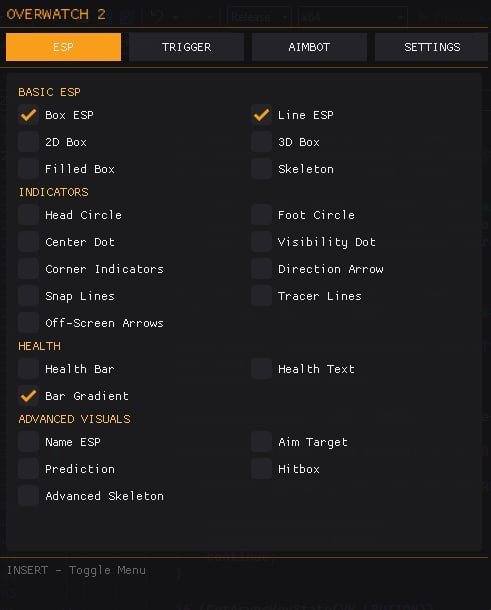
The current selection lists boxes, skeletons, names, health, hitbox information and directional indicators. ESP customization includes thickness, borders and distance presentation. If a feature is not listed, ask about it before assuming it is included. An arrow marker alone does not establish radar support.

Confirm Platform & Recording Requirements

The product specifies Steam and windowed/borderless mode. Streamproof is explicitly listed as No. If launcher support or recording behavior matters to your selection, resolve that question from the current listing. Read compatibility details instead of assuming another OW2 package supports the same environment.

Review Access & Current Status

Check the selected access duration and current product status before purchasing or launching. Review the applicable activation, maintenance and refund terms on the listing and site. A status label reports the stated condition at a point in time; the risk page explains why it cannot promise future protection.

Explore Related OW2 Features

Read aimbot controls, player ESP and triggerbot settings for the combat and visual selection. The settings guide organizes the menu categories, and compatibility information covers the listed Steam and Windows environment.

Use the current OW2 product listing for the current feature list and ESHub Discord support for a specific product question.

OW2 GAMEPLAY

Overwatch 2 Gameplay Preview

Watch the supplied OW2 gameplay video, then explore the menu, aiming and ESP images below.

Open the gameplay video β†’

MENU & FEATURE PREVIEWS

Explore the OW2 Images

Use the arrows to browse the menu, aimbot and ESP. Click an image to enlarge it.

Overwatch 2 Menu preview
Menu

Questions & Answers

Should I choose only by price?

Compare features, compatibility, access terms and support as well as price.

Is Battle.net support confirmed?

The current listing specifies Steam; this pack does not claim Battle.net support.

Does the package hide its overlay from recording?

No. Streamproof is explicitly listed as No.

OVERWATCH 2 COLLECTION

Explore All OW2 Pages

Browse aiming and visual features, compatibility, settings and common questions.

Explore Overwatch 2 Cheats

Browse current OW2 access options and the documented aiming, firing and visual features.

Γ—
Γ—
  • Create New...