Jump to content
Having Trouble Paying? Click here to join the Discord, You can pay with Card, Paypal, Cashapp, Venmo, Zelle, Apple Pay! ×
🤖ARC Raiders Frozen Trail! | Save 10% on all ARC Raiders products using code: ARC 🤖 (Click Me) ×

OW2: Mason
Undetected Cheat

ESHub provides premium undetected game softwares, DMA Hardware, ESP, Aimbot, and HWID spoofers for popular PC titles including Apex Legends, Arena Breakout Infinite, ARC Raiders, Escape from Tarkov, Fortnite, Rust, Rainbow Six Siege, and more. Our solutions are secure, frequently updated, and designed to stay undetected.
Explore All Softwares
50,000+ Keys DELIVERED
★★★★★ 4.9/5 FROM 500+ REVIEWS
OW2: Mason

Product Images

OW2: Mason
OW2: Mason
OW2: Mason
OW2: Mason

OW2: Mason

  • Instant Delivery
  • Undetected
    External Approved 1/5 Setup Difficulty
$5.99
OVERWATCH 2

OW2: Mason

OW2: Mason combines configurable aimbot and triggerbot controls with player ESP, health indicators, skeletons and advanced targeting visuals. Fine-tune smoothing, distance filters and overlay colours from one menu.

PC / MASON
Windows 10 / 11 x64Supported builds listed below
Intel & AMDSupported processors
SteamSupported game version
Windowed / BorderlessWindowed fullscreen supported

Product showcase

Explore the features

8 categories / 59 listed features

Expand a category to see its complete feature list. Numeric values below reflect the supplied menu settings.

Basic ESP

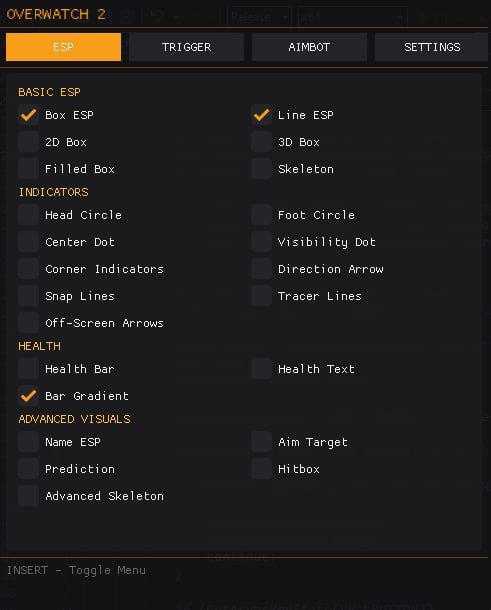
Player boxes, frames and skeleton overlays.

6
  • Box ESP / Player Frames
  • 2D Box
  • Filled Box
  • Line ESP / Lines to Players
  • 3D Box
Show 1 more featuresShow fewer features
  • Skeleton

Indicators

On-screen markers, direction cues and off-screen information.

9
  • Head Circle
  • Center Dot
  • Corner Indicators
  • Snap Lines
  • Off-Screen Arrows
Show 4 more featuresShow fewer features
  • Foot Circle
  • Visibility Dot
  • Direction Arrow
  • Tracer Lines

Health & Advanced Visuals

Health information, player names and targeting visuals.

8
  • Health Bar
  • Health Text
  • Bar Gradient
  • Name ESP
  • Prediction
Show 3 more featuresShow fewer features
  • Advanced Skeleton
  • Aim Target
  • Hitbox

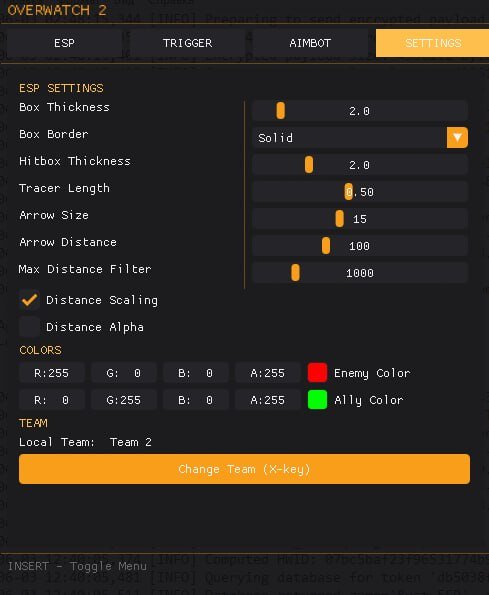
ESP Settings

Adjust overlay sizing, borders, distance filters and scaling.

9
  • Box Thickness: 2.0
  • Box Border: Solid
  • Hitbox Thickness: 2.0
  • Tracer Length: 0.50
  • Arrow Size: 15
Show 4 more featuresShow fewer features
  • Arrow Distance: 100
  • Max Distance Filter: 1000
  • Distance Scaling
  • Distance Alpha

Aimbot

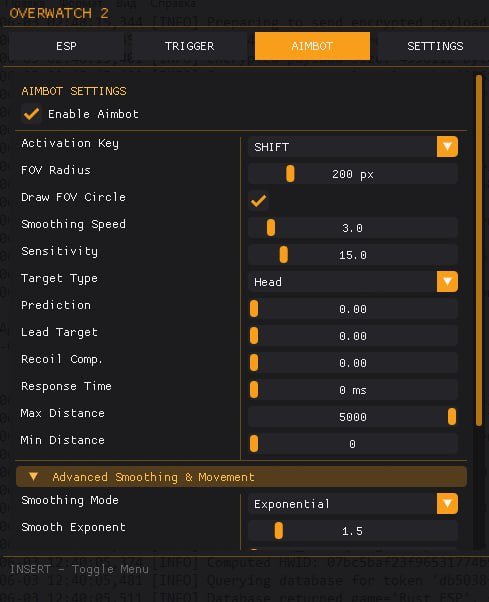
Automatic targeting with activation, prediction and distance controls.

13
  • Enable Aimbot
  • Activation Key: SHIFT
  • FOV Radius: 200 px
  • Draw FOV Circle
  • Smoothing Speed: 3.0
Show 8 more featuresShow fewer features
  • Sensitivity: 15.0
  • Target Type: Head
  • Prediction: 0.00
  • Lead Target: 0.00
  • Recoil Compensation: 0.00
  • Response Time: 0 ms
  • Max Distance: 5000
  • Min Distance: 0

Advanced Smoothing

Control the aim movement curve.

2
  • Smoothing Mode: Exponential
  • Smooth Exponent: 1.5

Triggerbot

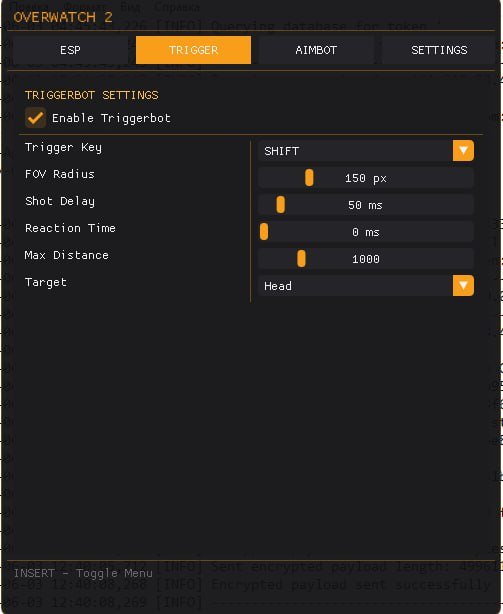
Automatic firing with separate activation, timing and targeting settings.

7
  • Enable Triggerbot
  • Trigger Key: SHIFT
  • FOV Radius: 150 px
  • Shot Delay: 50 ms
  • Reaction Time: 0 ms
Show 2 more featuresShow fewer features
  • Max Distance: 1000
  • Target: Head

Colors, Team & Menu

Enemy and ally colours, team selection and menu access.

5
  • Enemy Color: Red (RGB: 255, 0, 0)
  • Ally Color: Green (RGB: 0, 255, 0)
  • Local Team: Team 2
  • Change Team: X
  • Toggle Menu: INSERT

Compatibility

Game version

Overwatch 2 — Steam

Operating system

Windows 10 / 11 x64

Listed Windows versions

2004 / 20H2 / 21H1 / 21H2 / 22H2 / 23H2

Processors

Intel & AMD

Game display mode

Windowed or borderless windowed (fullscreen in window)

Anti-cheat compatibility

In-game anti-cheat, as listed in the product specifications

Streamproof

No — the product is not listed as streamproof.

About OW2: Mason

OW2: Mason is an Overwatch 2 cheat for PC featuring aimbot, triggerbot and player ESP. Its visual tools include multiple box styles, skeletons, health displays, off-screen arrows, player names and hitbox information.

Aimbot and triggerbot controls

Adjust aimbot FOV, smoothing speed, sensitivity, target type, prediction, lead targeting and recoil compensation. Minimum and maximum aim distances are listed separately. Triggerbot includes its own activation key, FOV, shot delay, reaction time and distance settings.

Player ESP and overlay customisation

Choose from 2D, 3D and filled boxes, skeletons, player lines and directional indicators. Health bars, health text and names add player information, while thickness controls, border styles, distance scaling and distance alpha let you customise the display.

Colours, team selection and menu keys

The supplied menu lists red enemy colours and green ally colours. Team controls include a local-team setting and an X-key team change. Press INSERT to toggle the menu; SHIFT is the listed activation key for both aimbot and triggerbot.

Frequently asked questions

Which game version is supported?

The supplied requirements list the Steam version of Overwatch 2.

Which Windows versions are listed?

Windows 10 / 11 x64, with versions 2004, 20H2, 21H1, 21H2, 22H2 and 23H2 listed in the supplied requirements.

Which display mode should I use?

Use windowed or borderless windowed mode. The supplied requirements describe the latter as fullscreen in window.

Is OW2: Mason streamproof?

No. The supplied product specifications explicitly list streamproof as No.

Which keys are listed for the menu and activation?

INSERT toggles the menu. SHIFT is listed for aimbot and triggerbot activation, and X is listed for changing the team setting.

×
×
  • Create New...