Jump to content
Having Trouble Paying? Click here to join the Discord, You can pay with Card, Paypal, Cashapp, Venmo, Zelle, Apple Pay! Γ—
πŸ€–ARC Raiders Frozen Trail! | Save 10% on all ARC Raiders products using code: ARC πŸ€– (Click Me) Γ—


  • Overwatch 2 Cheats for Beginners: Understand Your First OW2 Menu

    Explore Overwatch 2 cheats for beginners. Understand aimbot, triggerbot, ESP, menu keys, compatibility and the controls shown in OW2 previews.

    Browse Overwatch Cheats
  • Featured Products

OVERWATCH 2

Understand Your First OW2 Menu

An Overwatch 2 cheat menu is easier to understand when its controls are grouped by purpose. Start with aim activation and selection, then player information and trigger timing. Review the supported game version and display mode before treating an unfamiliar menu setting as a launch or compatibility problem.

DETAILS & CONTROLS

Overwatch 2 Cheats for Beginners

Know the Main Categories

Read the feature overview before interpreting the menu. Aimbot concerns tracking, triggerbot concerns firing automation and ESP adds information around players. Understanding those roles helps separate a visual preference from a combat setting or an activation key.

Read Keys & Example Values

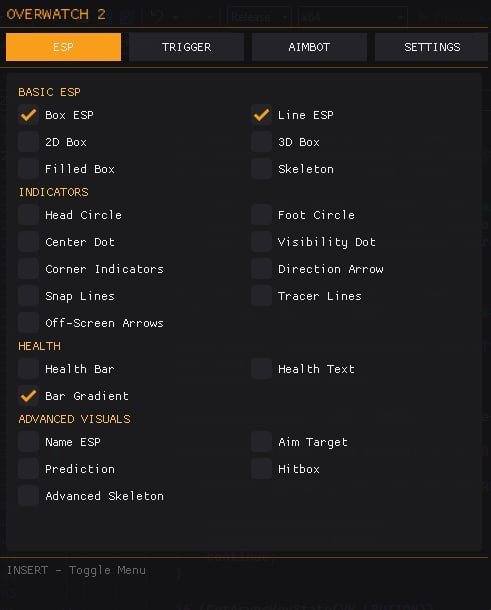
INSERT is the listed menu key, while SHIFT appears for aimbot and triggerbot activation. The supplied numerical values describe a menu example. They are not a requirement to copy every value. Check the active fields and keybinds before assuming an older screenshot still describes the configuration being used.

Keep Visual Information Readable

Boxes, skeletons, names and health displays are separate elements. Arrow sizing, thickness, distance filtering and colors provide presentation controls. Read the settings guide to understand those categories together. Enabling more elements adds more information, so identify the purpose of each marker rather than treating all visuals as interchangeable.

Check the Supported Environment

The current product lists Steam, Windows 10/11 x64, Intel and AMD processors, and windowed or borderless mode. It explicitly lists no streamproof support. Read the compatibility page and current instructions for the supported Windows builds. This page does not extend those requirements to unlisted launchers or console versions.

Ask About the Actual Symptom

If the menu is absent, use menu troubleshooting. If the menu works but player markers are absent, use ESP troubleshooting. Tell ESHub Discord support the product, Windows build and exact symptom. That makes the question more useful than a general report that nothing works.

Explore Related OW2 Features

Read aimbot controls, player ESP and triggerbot settings for the combat and visual selection. The settings guide organizes the menu categories, and compatibility information covers the listed Steam and Windows environment.

Use the current OW2 product listing for the current feature list and ESHub Discord support for a specific product question.

OW2 GAMEPLAY

Overwatch 2 Gameplay Preview

Watch the supplied OW2 gameplay video, then explore the menu, aiming and ESP images below.

Open the gameplay video β†’

MENU & FEATURE PREVIEWS

Explore the OW2 Images

Use the arrows to browse the menu, aimbot and ESP. Click an image to enlarge it.

Overwatch 2 Menu preview
Menu

Questions & Answers

Are screenshot values required settings?

No. They describe the supplied menu example.

Which platform is listed?

The current selection lists the Steam version of Overwatch 2.

Can I ask before buying?

Use ESHub Discord support for product-specific feature and compatibility questions.

OVERWATCH 2 COLLECTION

Explore All OW2 Pages

Browse aiming and visual features, compatibility, settings and common questions.

Explore Overwatch 2 Cheats

Browse current OW2 access options and the documented aiming, firing and visual features.

Γ—
Γ—
  • Create New...