
-
Buy Hood Warfare 2 Cheats
How to Use Hood Warfare 2 Cheats: Aim, ESP, Radar & Saved Settings
Learn about Hood Warfare 2 cheat features, access and setup. Explore aiming, overlays and saved profiles with ESHub.
-
Featured Products
Aim, ESP, Radar & Saved Settings
Learn about Hood Warfare 2 cheat features, access and setup. Explore aiming, overlays and saved profiles with ESHub.
Hood Warfare 2 Gameplay Showcase
Watch Hood Warfare 2: Orbit in action, then explore the features and interface previews below.
Understand the Menu Groups
Orbit separates targeting, player visuals, item information, awareness and customization. Aim activation decides when aiming operates, target filters decide which candidates are considered, and smoothing shapes the response. Player and item overlays provide information independently. Understanding those groups makes a saved setup easier to review and adjust.
Review Aiming Controls
The published options include an optional aim key, delay, five priorities, target bones, bone scan and prediction. Basic smoothing profiles and advanced Bezier settings offer different customization levels. Aim FOV radius is separate from the camera FOV override. Magic Bullet is another listed toggle; its name should not be expanded into unlimited range or guaranteed hits.
Arrange Player & Item Information
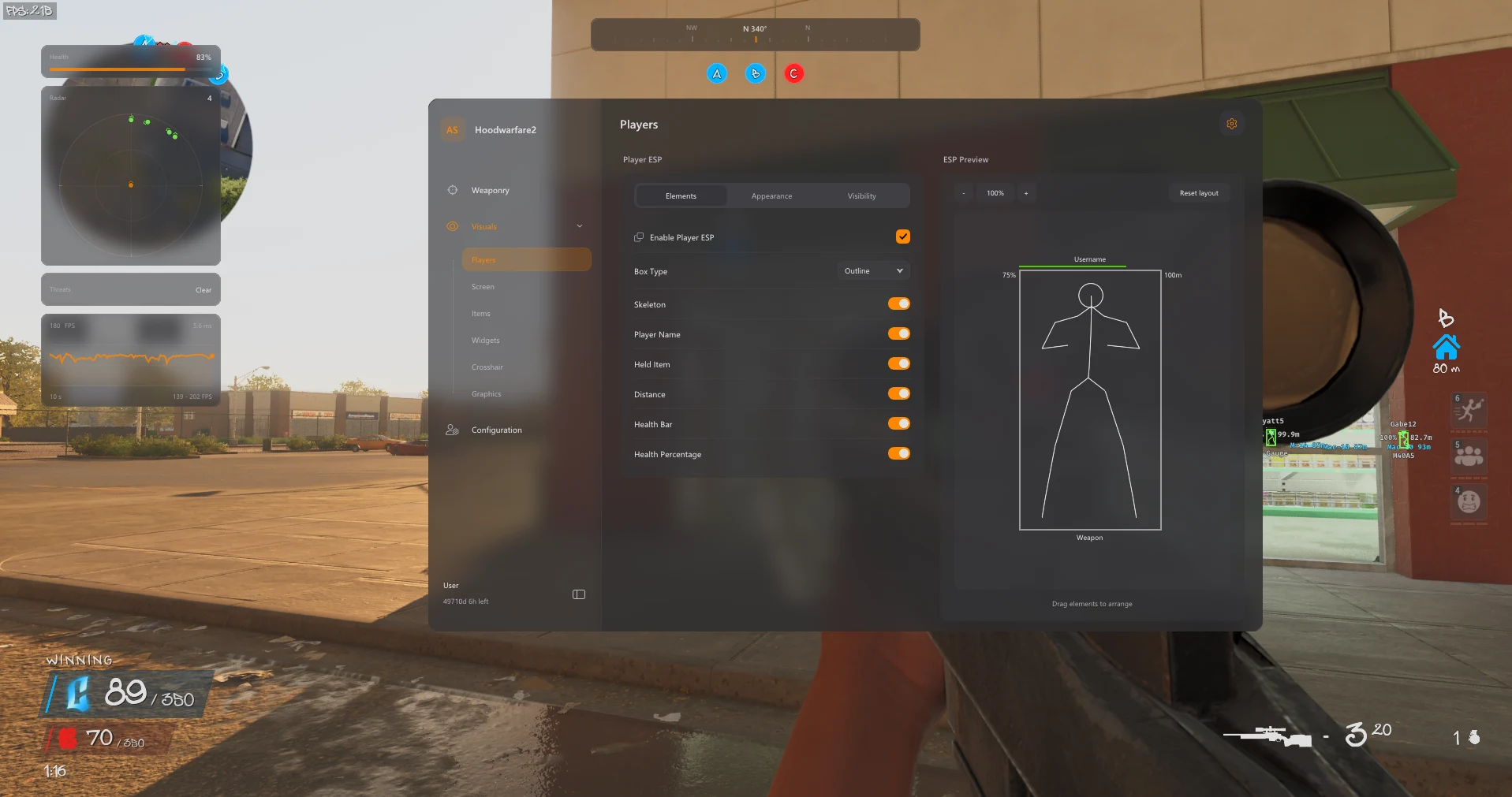
Use the editable ESP preview to organize names, health, held items and distance around player markers. Team colors, visibility filters and render distance determine which overlays appear. Item ESP has separate category and range controls for weapons, supplies, objectives and other listed objects. Displaying a pickup does not collect it automatically.
Build Your HUD & Visual Layout
Radar size, scale and blip radius work alongside compass markers and off-screen arrows. Crosshair controls and health, weapon, ammo and performance widgets personalize the screen. The newer features include a movable music player, configurable tracers and impact markers, lighting adjustments and camo modes. Select the information you need so panels remain readable.
Save Your Configuration & Get Help
Save a named profile after arranging supported settings. The config browser lets you load profiles and delete custom ones while retaining the default. Use the current product instructions for menu access rather than assuming a universal hotkey. For launch or feature errors, contact ESHub with your order details, Windows release and exact message.
Explore the Hood Warfare 2 Interface
Browse all eight screenshots from the product listing. Use the arrows to switch images, or click an image to enlarge it.
PC Compatibility & Access
The product lists Windows 11 23H2, 24H2 and 25H2. Windows 10 22H2 has limited compatibility and no technical support. Review the current product requirements and available durations before purchase. Use the download supplied with your order and contact ESHub for compatibility questions.
Choose Your License →Hood Warfare 2 Aimbot Cheats: Questions & Answers
Where are the available controls listed?
The sections above follow Orbit’s published feature list. Open the linked product page for the complete menu groups and current availability.
Can I keep my customized setup?
Yes. Named profiles can be saved, loaded and deleted, with the default profile retained.
Where do I buy access or get help?
Choose an available duration on the Orbit product page. Contact ESHub Discord support for order and setup questions. Availability can change after updates; no cheat guarantees protection from bans.
Explore All Hood Warfare 2 Features
Customize Your Hood Warfare 2 Setup
Explore aiming, player and item visuals, radar, movement and personalization in the complete product.
Get Hood Warfare 2 Access →