
-
Explore Hood Warfare 2
Hood Warfare 2 Crosshair & HUD Cheats: Custom Reticle, Health & Ammo Widgets
Explore Hood Warfare 2 crosshair and HUD cheats with reticle presets, health, weapon, ammo and FPS widgets. Review dimensions, rotation and opacity controls.
-
Featured Products
Custom Crosshairs, Widgets & Music
Explore Hood Warfare 2 crosshair & hud cheats with customizable controls and ESHub access. Custom Crosshairs, Widgets & Music bring the relevant features together in your PC setup.
Hood Warfare 2 Gameplay Showcase
Watch Hood Warfare 2: Orbit in action, then explore the features and interface previews below.
Design Your Crosshair
Hood Warfare 2 crosshair controls include presets and editable color, gap, length, thickness and rotation. Build a center-screen marker that remains readable against the scene without crowding your player labels. Crosshair settings personalize presentation; target selection and aiming response remain in the separate aimbot category. Use the presets as a starting point, then refine the available geometry controls.
Health, Weapon & Ammo Widgets
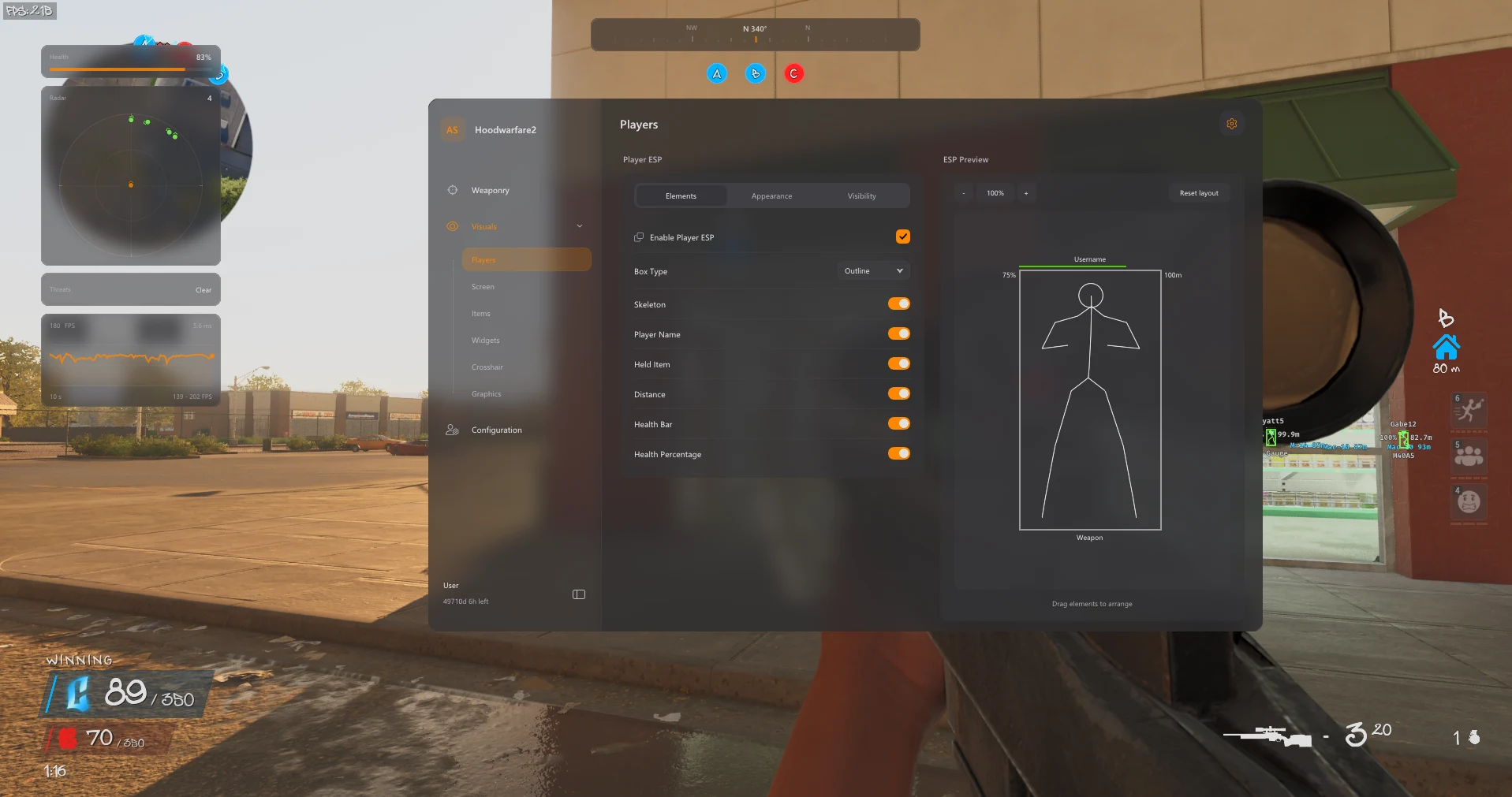
HUD tools include an equipped-weapon display, loaded-ammo information and a healthbar widget. These panels bring relevant condition and equipment information into your screen layout. Widget opacity and layout reset add presentation controls. Arrange the HUD alongside your ESP labels so information remains readable rather than layering multiple displays over the same area.
FPS Counter & Frame History
The product lists an FPS counter and a frame-history graph for displaying performance information. These widgets describe the current view of performance; they do not promise an increase in frame rate. Pair them with the graphics controls if you want to inspect your display while adjusting supported visual effects. Preserve the layout in a named configuration once you find a setup you prefer.
Movable In-Game Music Player
The updated feature list includes in-game music playback and a movable Music Player widget. Previous, next, pause, resume and volume controls let you manage playback from the interface. Its position can be adjusted alongside the other display elements. Music playback is a personalization feature separate from aim, radar and player tracking, and its available controls are listed on the current Orbit product page.
Explore the Hood Warfare 2 Interface
Browse all eight screenshots from the product listing. Use the arrows to switch images, or click an image to enlarge it.
PC Compatibility & Access
The product lists Windows 11 23H2, 24H2 and 25H2. Windows 10 22H2 has limited compatibility and no technical support. Review the current product requirements and available durations before purchase. Use the download supplied with your order and contact ESHub for compatibility questions.
Choose Your License →Hood Warfare 2 Crosshair & HUD Cheats: Questions & Answers
Where are the available controls listed?
The sections above follow Orbit’s published feature list. Open the linked product page for the complete menu groups and current availability.
Can I keep my customized setup?
Yes. Named profiles can be saved, loaded and deleted, with the default profile retained.
Where do I buy access or get help?
Choose an available duration on the Orbit product page. Contact ESHub Discord support for order and setup questions. Availability can change after updates; no cheat guarantees protection from bans.
Explore All Hood Warfare 2 Features
Customize Your Hood Warfare 2 Setup
Explore aiming, player and item visuals, radar, movement and personalization in the complete product.
Get Hood Warfare 2 Access →