
-
Buy Hood Warfare 2 Cheats
Hood Warfare 2 Cheats for Beginners: Aimbot, ESP & Radar Explained
Learn about Hood Warfare 2 cheat features, access and setup. Explore aiming, overlays and saved profiles with ESHub.
-
Featured Products
Aimbot, ESP & Radar Explained
Learn about Hood Warfare 2 cheat features, access and setup. Explore aiming, overlays and saved profiles with ESHub.
Hood Warfare 2 Gameplay Showcase
Watch Hood Warfare 2: Orbit in action, then explore the features and interface previews below.
Start with the Main Feature Categories
Aimbot, ESP and radar describe different systems. Aimbot covers target selection and aiming response. ESP displays supported information around players or objects. Radar offers a compact positional display. Orbit combines those categories with world markers, HUD tools, graphics settings and named profiles. Choose access based on the listed controls and your PC requirements.
What Aimbot Settings Mean
An aim key and delay concern activation. Priorities and bones concern selection. Smoothing profiles and Bezier settings concern movement. The targeting FOV is a selection radius rather than the camera’s view angle. Prediction and Magic Bullet are separately listed controls. No setting name establishes a guarantee against bans or success in every encounter.
What ESP & Wallhack Show
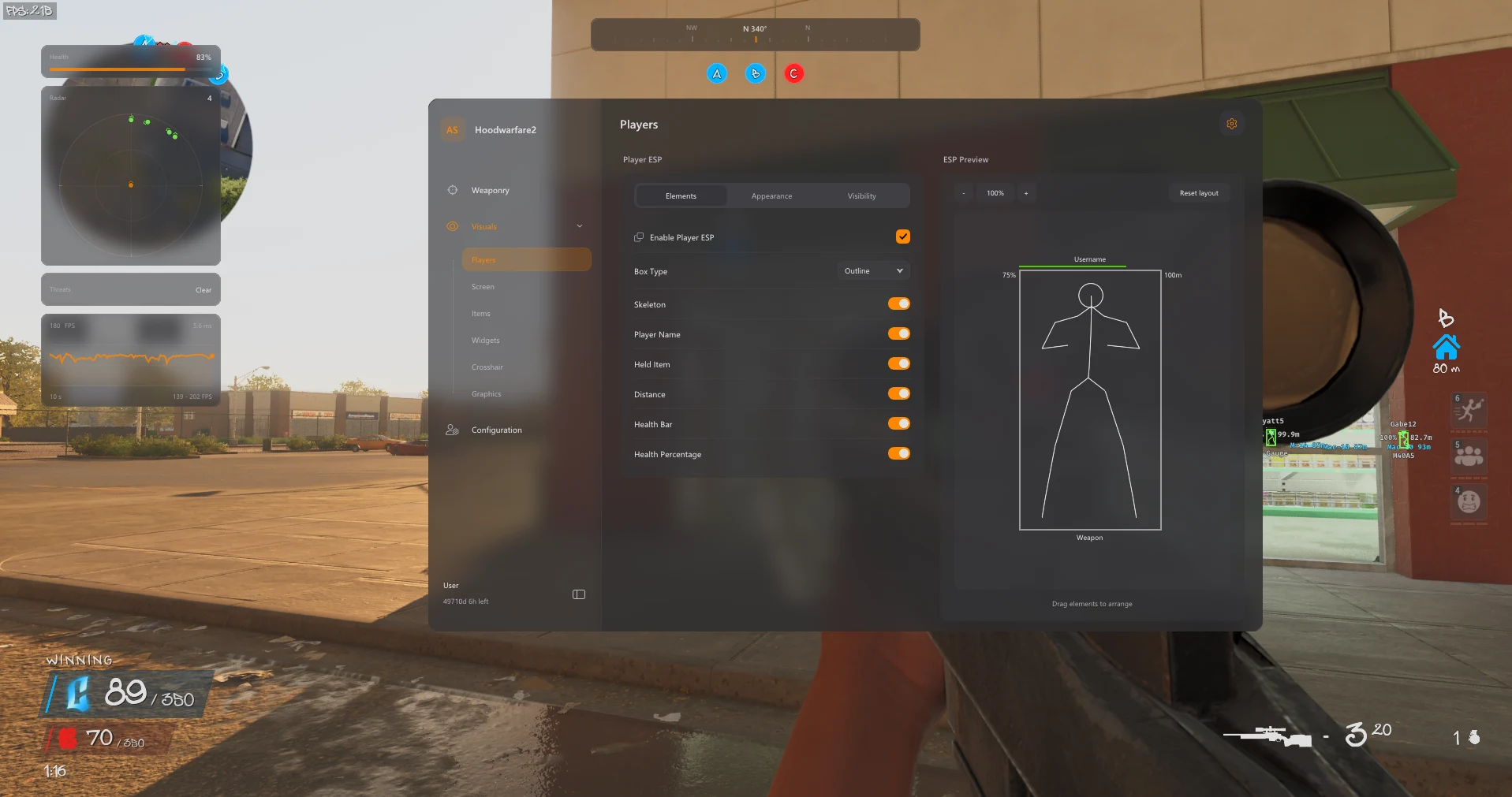
Player ESP can display boxes, skeletons, names, held items, health and distance. Wallhack is a common search term for positional visuals through cover; visibility filters affect the actual display. World ESP has its own item categories. Use the editable layout and selected labels to keep the view understandable instead of assuming more information is always more useful.
Radar, Graphics & New Features
Radar, compass information and off-screen indicators complement the main player view. Graphics options include camera FOV, effect toggles, Fullbright and No Fog. New movement and personalization features include Bunny Hop, a speed editor, music playback, tracers and camo selection. These are distinct controls with their own purposes.
Before You Buy
Check Windows compatibility, current status, available durations and the latest product instructions. Get downloads through your ESHub purchase, preserve your order details and ask support about unclear requirements. Named configs help retain a readable setup. Begin with the feature guides below to understand the product before selecting your license.
Explore the Hood Warfare 2 Interface
Browse all eight screenshots from the product listing. Use the arrows to switch images, or click an image to enlarge it.
PC Compatibility & Access
The product lists Windows 11 23H2, 24H2 and 25H2. Windows 10 22H2 has limited compatibility and no technical support. Review the current product requirements and available durations before purchase. Use the download supplied with your order and contact ESHub for compatibility questions.
Choose Your License →Hood Warfare 2 Aimbot Cheats: Questions & Answers
Where are the available controls listed?
The sections above follow Orbit’s published feature list. Open the linked product page for the complete menu groups and current availability.
Can I keep my customized setup?
Yes. Named profiles can be saved, loaded and deleted, with the default profile retained.
Where do I buy access or get help?
Choose an available duration on the Orbit product page. Contact ESHub Discord support for order and setup questions. Availability can change after updates; no cheat guarantees protection from bans.
Explore All Hood Warfare 2 Features
Customize Your Hood Warfare 2 Setup
Explore aiming, player and item visuals, radar, movement and personalization in the complete product.
Get Hood Warfare 2 Access →