
-
Browse EFT Cheats
Escape from Tarkov: Loot ESP & Value Filters
Explore EFT loot ESP, prices and value filtering. Review Lite’s price-per-slot, tier, color and distance controls separately from container and corpse displays.
-
Featured Products

EFT Loot ESP: Item Prices, Tiers & Price Per Slot
Loot ESP presents world-item information. Full lists price, tier and distance; Lite publishes tier-specific minimum values, ranges and colors, plus a price-per-slot option. These controls describe different reasons an item might be shown or excluded.
For searchable objects and bodies, use Container & Corpse ESP. For automated actions, use Auto Loot.
Item Value and Display Eligibility
A minimum-value filter and a draw-distance limit are different checks. An item may meet a value threshold but remain outside the selected range. Lite’s tier entries include both types of control.
Price per slot expresses value relative to inventory space. It should not be described as the same field as total item value. The feature list does not specify a guaranteed realized sale price or a fixed price-update schedule.
EFT Gameplay & Menu Previews
Watch the supplied gameplay video and open a screenshot for a closer look.
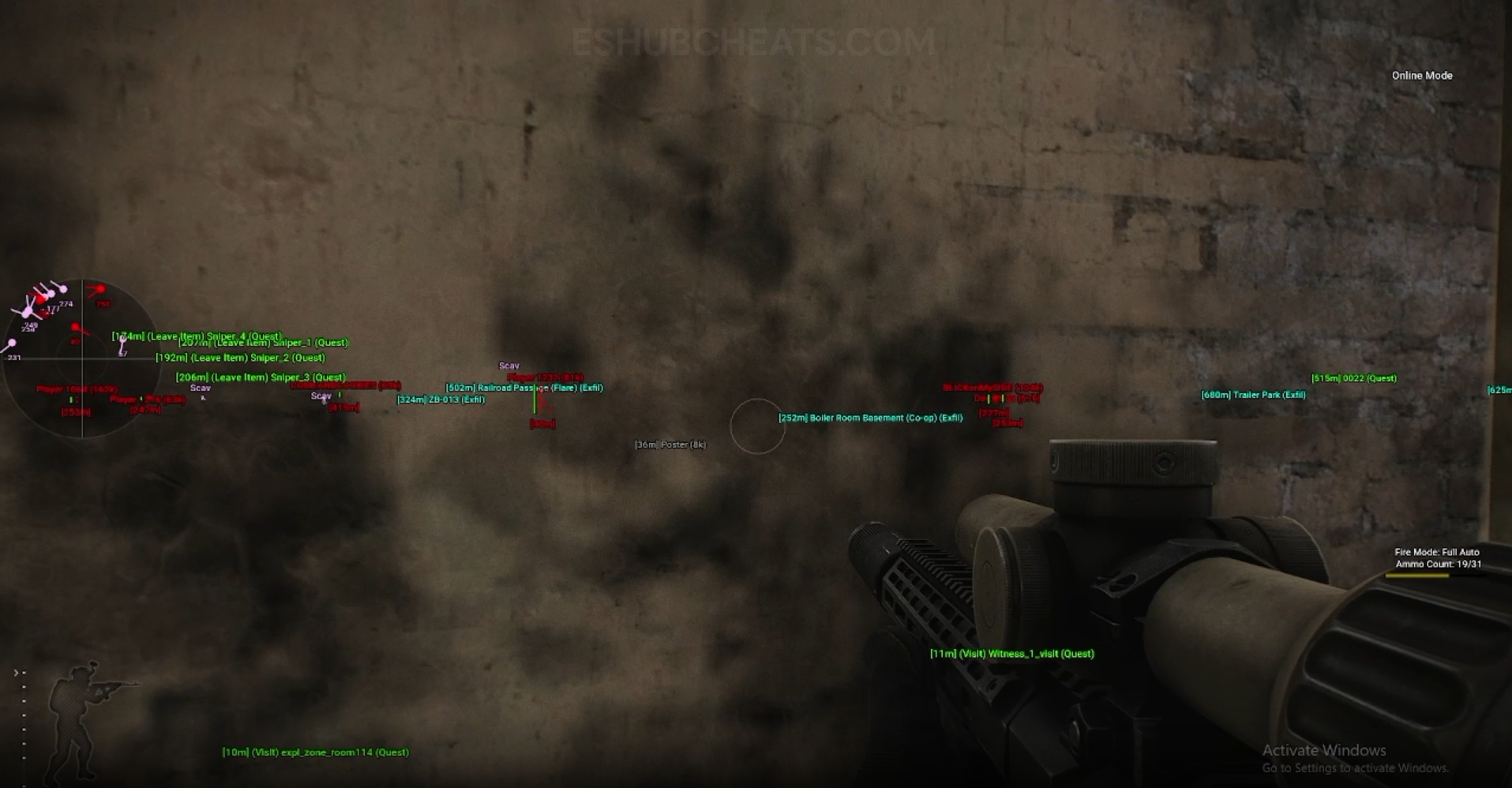
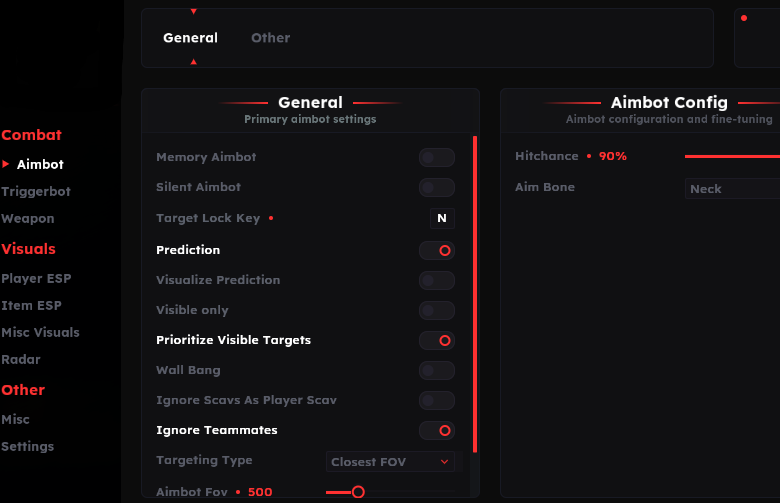
Screenshots show example displays and settings, rather than recommended values or proof that every listed feature appears in the footage.
Loot ESP & Value Filters: Main Concepts
Understand these groups before comparing menu controls or profiles.
Price Information
A displayed value is an information field; confirm the product’s data source if exact pricing matters.
Price Per Slot
Lite lists a value-relative-to-space option alongside its loot controls.
Tier Filters
Lite lists five tiers with their own minimum values and ranges.
Range & Colors
An item’s appearance and its eligibility to draw are separate questions.
EFT Loot ESP & Value Filters: Features & Differences
Check which entries belong to the selected package and the relevant feature group.
Lite lists a dedicated loose-loot display choice.
Full names price, tier and distance in its loot summary.
Explicitly listed in Lite, separately from total value.
Lite provides minimum-value controls for tiers 1–5.
Each listed tier can have a maximum display range.
Color choice is independent of the value threshold.
Lite lists an Important Item System; Full names a valuable-item indicator.
Containers and corpses have their own display entries.
Check Value, Range and Object Type
Identify whether the missing marker belongs to loose loot, a container or a corpse. Then inspect the applicable tier, minimum value and range. Avoid treating every absent object as one global ESP failure.
Config & Settings explains stored filters. Quest Helper concerns task markers rather than ordinary value filtering.
Loot Controls Across the Packages
Compare documented coverage rather than assuming shared category names mean identical menus.
EFT: Full
Full’s summary lists loot price, tier and distance. Confirm detailed controls in its current menu.
View EFT: Full Features →EFT: Lite
Lite explicitly lists price per slot, five tiers, minimum values, range and color entries. Those specifics should not be assumed identical in Full.
View EFT: Lite Features →Displaying Loot Is Different from Collecting It
Auto Loot & Loot Through Walls covers separately listed action features. A visible item marker does not mean the software automatically collects that item.
Container & Corpse ESP explains the other object displays without turning them into automation claims.
Compare the EFT Product Options
Review current features, requirements, availability and licence terms on the selected listing.
EFT: Full
The internal package listing memory and silent aiming, visuals and additional movement/action features. Use its own setup guide and confirm the particular feature you need.
View EFT: Full →EFT: Lite
The internal package listing Triggerbot, detailed visual and loot controls, configurations and a separate PvE section. Compare its current coverage with your requirements.
View EFT: Lite →Do Not Treat Values as Guaranteed Returns
The listing confirms pricing-related fields, but does not establish an exact update interval or guaranteed sale outcome. A useful explanation keeps the field’s purpose separate from claims about profit.
For a value discrepancy, identify the item, displayed field and package. Ask about the source and refresh behavior rather than assuming a label has a fixed financial meaning.
Related Escape from Tarkov Guides
Frequently Asked Questions About Loot ESP & Value Filters
Does Lite list price per slot?
Yes. It appears as a distinct loot option.
Can a valuable item still be outside range?
Yes. Value and display distance are separate conditions.
Are corpse items the same group as loose loot?
No. The public lists separate those groups.
Does Loot ESP automatically collect items?
No. Auto Loot is a separate named feature.
Where are task items explained?
Use Quest Helper.
More Escape from Tarkov Guides & Products
Explore the main EFT overview, choose another topic from the guide directory or compare current product listings.
Compare EFT Full and Lite
Review the feature coverage for loot esp & value filters, then check current requirements, availability and licence terms before choosing.