
Aimbot
Per-weapon profiles, hitbox selection, recoil control and X/Y smoothing provide separate controls for targeting and tracking.
Read the Aimbot Guide →Explore Valorant aimbot, player ESP, triggerbot and skin customization for tactical firefights and spike-site encounters. Compare ESHub’s feature packages, browse detailed guides and review configuration options and PC requirements.
Discover Valorant: Omega, our featured Valorant package with configurable aim controls, detailed player and world ESP, triggerbot, cosmetic customization and an included temporary HWID spoofer.
Compare Omega with Valorant: EsHub and our Valorant: Color Aimbot. Each has its own feature set, controls and requirements.
Aimbot · ESP & Wallhack · Triggerbot · Skin Changer · Configs
Valorant cheats are third-party tools that provide supported aim, visual, input or customization functions. Aimbot concerns targeting, ESP displays information about players or world objects, and triggerbot controls firing when its supported conditions are met.
A color aimbot is a distinct approach: it identifies selected colors in the captured screen image and applies mouse movement. This differs from a package with player and world entity overlays. Choose based on the functions you need rather than assuming every product includes the same features.
Our Valorant purchase category contains the available packages. This guide explains their feature categories, while individual product pages carry their package-specific information.
A selection of Omega’s aim, visual, customization and loader features. Open the product page for the complete list.
Per-weapon profiles, hitbox selection, recoil control and X/Y smoothing provide separate controls for targeting and tracking.
Read the Aimbot Guide →Boxes, skeletons, health and armour bars show player information, with options such as agent labels and off-screen arrows.
Read the Player ESP Guide →Choose supported per-weapon skins, search cosmetics and adjust chroma variants or upgrade levels.
Read the Skin Changer Guide →Extras include custom hit sounds, bullet tracers, a spectator list and a keybind overlay.
Separate options hide supported visuals and menu elements from compatible capture methods.
Weapon profiles, hit chance, auto-stop and delay controls organize automatic firing behaviour.
Read the Triggerbot Guide →Spike information, ability filters and dropped-weapon visuals cover objectives and world objects separately from player ESP.
Read the World ESP Guide →Bhop, configurable bhop hit chance and auto-strafe provide movement assistance.
Save and load multiple setups and customize menu colours.
Read the Configurations Guide →Omega includes temporary HWID spoofing, a System Trace Cleaner and One-Click Spoof in its loader tools.
Read the Included HWID Spoofer Guide →Product screenshots supplied for Valorant: Omega. Menu appearance and available controls may change with updates.
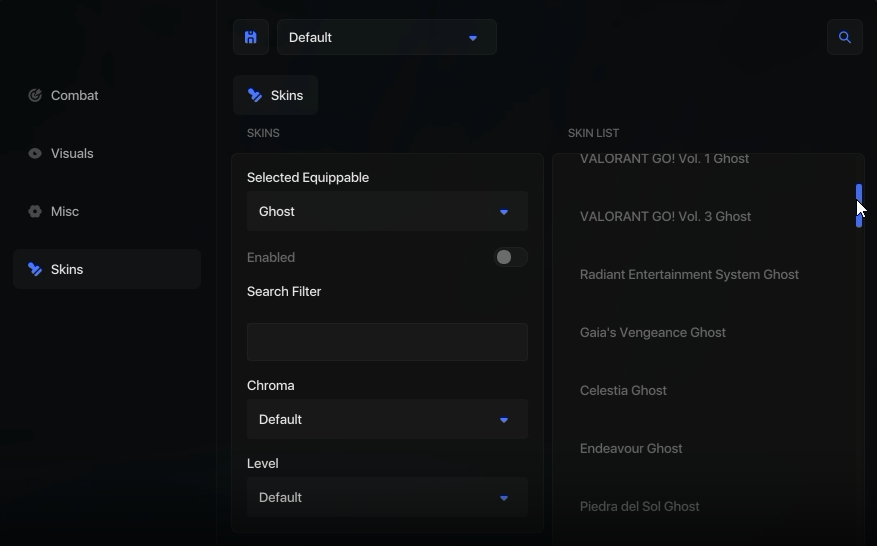
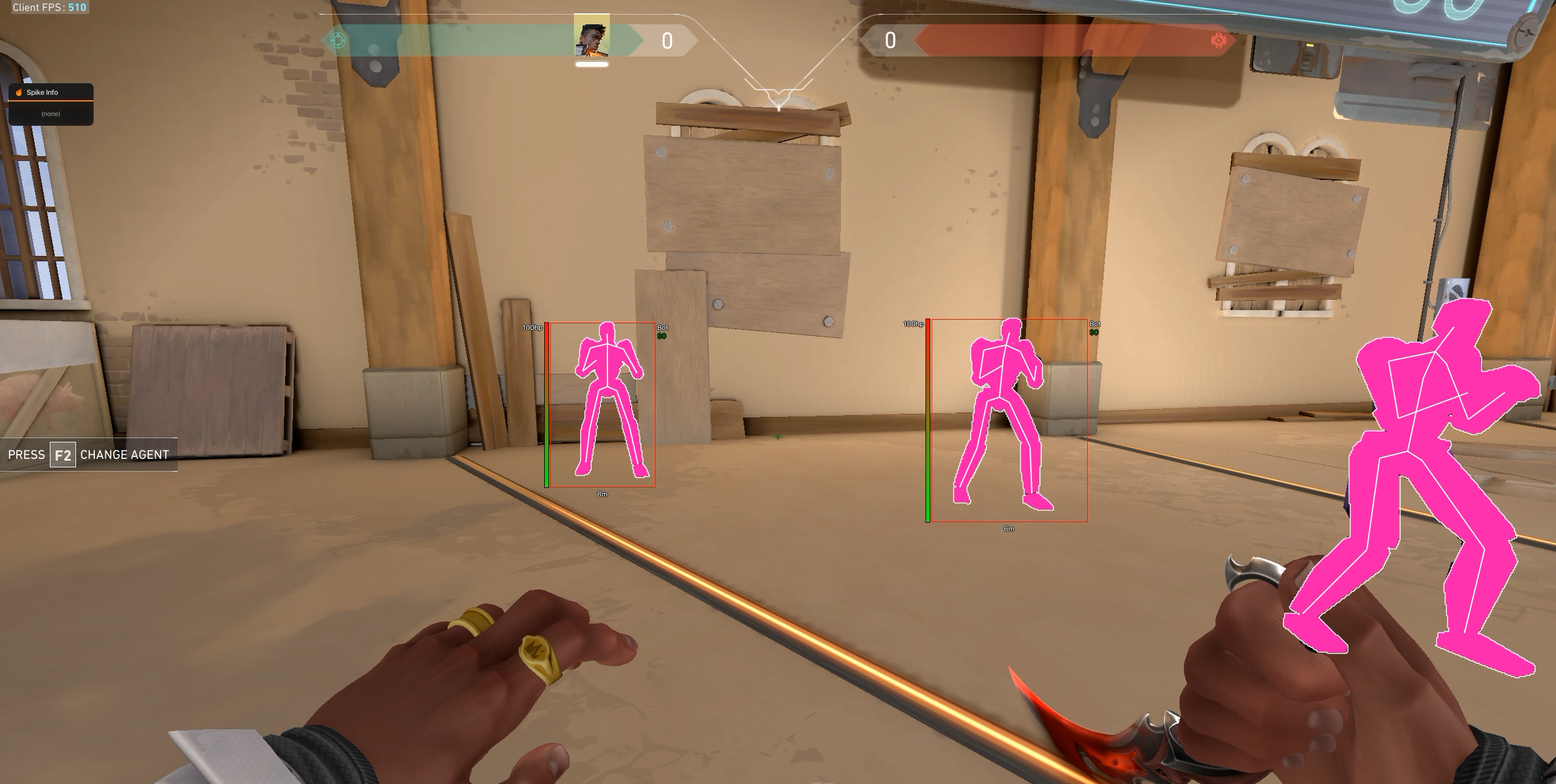
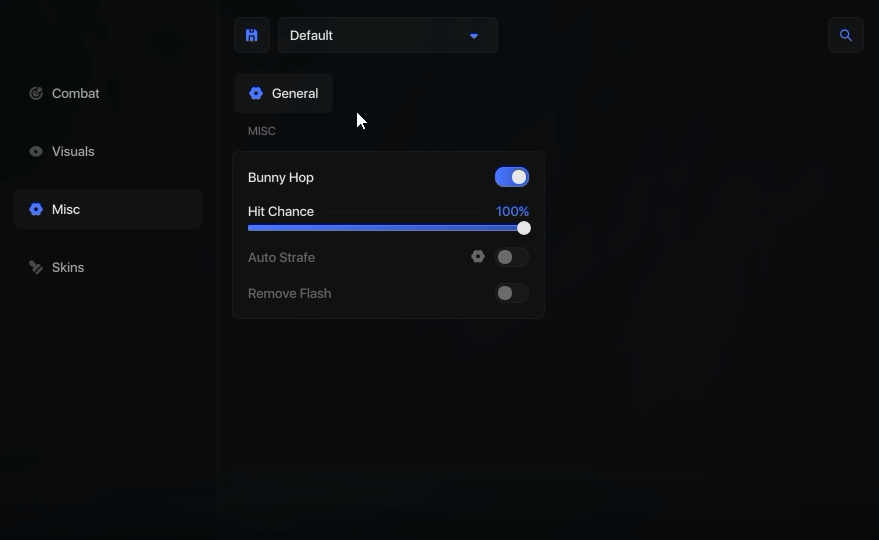
A built-in temporary HWID spoofer is one of Omega’s distinguishing package features. The supplied loader information also lists a System Trace Cleaner and One-Click Spoof, bringing those tools into the same product rather than listing a separate purchase requirement.
Confirm current Vanguard compatibility and loader instructions through the Omega product page. Omega and EsHub both include integrated temporary spoofing. Standalone temporary spoofers are not supported for Valorant in ESHub’s stated lineup. For separate permanent options, use the HWID spoofer category. Read the Valorant HWID Spoofer guide for the differences; spoofing does not restore a banned account.
Omega is the lead option in this guide. Valorant: EsHub offers a separate feature package, while the Color Aimbot focuses on screen-color targeting and mouse-based controls.
| Product | Feature focus | Supplied package prices |
|---|---|---|
| Valorant: Omega | Aimbot, triggerbot, player/world ESP, skin changer, movement, configs and included temporary HWID spoofer. | 7 days: $39.99 30 days: $79.99 |
| Valorant: EsHub | Silent Aim, Radar, chams, Anti-Aim, skins, custom models, emotes, included emulator and integrated temporary spoofing. | 3 days: $25.00 1 week: $45.00 1 month: $95.00 Lifetime: $250.00 |
| Valorant: Color Aimbot | Pixel-color targeting, triggerbot, mouse-based recoil compensation, filters and six configurable profiles. | 1 week: $39.99 1 month: $59.99 3 months: $149.99 1 year: $299.99 |
Prices shown reflect the supplied package information for this guide. Confirm the selected duration, current price and package terms on the product page before purchasing.
Valorant: EsHub’s supplied feature update expands into aim, visuals, anti-aim, miscellaneous customization and mods. These are EsHub-package features; they should not be assumed to be included in Omega or the Color Aimbot.
EsHub lists Silent Aim, Auto Shoot, recoil control and visibility checking, with FOV, smoothing and hitbox controls. Explore Silent Aim →
Player boxes, skeletons, health and agent information sit alongside chams, radar and Spike Info. Chams · Radar · Spike ESP
Pitch, yaw and manual override are part of the Anti-Aim category, alongside third-person and view options. Read Spinbot & Anti-Aim →
Supported customization includes Unlock All, finishers and kill effects, plus skybox and fog controls. Read Skin Changer & Unlock All →
Examples include Anti-Flash, Bunny Hop, Instalocker and custom agent models such as Sasuke for Phoenix or Ryuk for Sova, alongside emotes. See Custom Models & Emotes →
EsHub lists save/load configurations, a VGK emulator, VAN 152 bypass and integrated temporary spoofing. These are separate functions and do not reverse an account penalty. VGK Emulator
The Color Aimbot is listed as external and mouse based, without game injection or game-file modification. Its targeting uses selected enemy highlight colors rather than a player ESP overlay. The supplied feature list does not include player wallhack or world ESP.
Pixel-color detection uses enemy highlight colours, with X/Y FOV, smoothing, offsets and speed controls.
Configurable smoothing can increase while spraying. These controls describe mouse movement rather than a safety guarantee.
Triggerbot offers activation and firing-delay controls. Recoil compensation applies downward mouse movement with strength and start-delay settings.
Weapon-category settings and six profiles provide separate configurations. Options include purple-colour and smoke filters; these are targeting filters rather than world ESP.
Follow the requirements for the exact package you choose. Omega’s supplied requirements list virtualization enabled, Secure Boot disabled, TPM 2.0 and Memory Integrity enabled, and Defender disabled before launch. These are product-specific requirements, not general Valorant setup advice; review their implications and current instructions before changing your system.
Omega supports multiple saved configurations and menu customization. The Color Aimbot has six profile slots and its own weapon-category controls. Do not assume profiles, menu keys or settings files transfer between products. EsHub lists Windows 10 & 11, AMD & Intel processors and Borderless & Windowed modes. Review System Requirements and Config & Settings for the exact package.
Check the ESHub status page and your selected product before use. Streamproof refers to supported capture behavior, while anti-cheat detection is a different question. No method, spoofer or status label guarantees freedom from account penalties. The dedicated Cheat Safety guide explains these distinctions.
Valorant: Omega is the main featured product. Its supplied feature list includes aimbot, triggerbot, player and world ESP, skin customization, movement tools, configurations, streamproof options and a built-in HWID spoofer.
Omega and EsHub include integrated temporary spoofing. Omega also lists System Trace Cleaner and One-Click Spoof. Standalone temporary spoofers are not supported for Valorant in ESHub’s stated lineup; separate permanent options are linked through the HWID spoofer category.
The supplied Color Aimbot list describes pixel-color targeting, triggerbot, mouse-based recoil compensation, filters and profiles. It does not list player ESP or wallhack.
A skin changer provides supported cosmetic customization through the software. Do not assume those selections create permanent inventory ownership, transferability or access after the software stops running.
No. Omega, Valorant: EsHub and the Color Aimbot have separate controls, feature sets and system requirements. Use the instructions for the exact product you choose.
No. Streamproof describes behavior with supported capture methods. It does not establish anti-cheat invisibility or eliminate account risk.
Use the individual ESHub product pages for current package information and the ESHub status page for reported product status. Neither a status label nor a feature description guarantees future compatibility.
Choose a focused guide for the feature or setup question you want to explore. These pages explain the differences between ESHub’s packages in more detail.
Start with the features you need, then compare product requirements and subscription duration. Omega combines aim, triggerbot and detailed ESP with skin customization and integrated spoofing. EsHub has its own extended feature set; the Color Aimbot focuses on pixel targeting and mouse controls.
Use How to Choose Cheats for the comparison, Free vs Paid for access and subscription questions, and Cheats for Beginners for the starting overview.
If setup does not behave as expected, identify the exact symptom. Menu Not Opening covers loader and menu access; ESP Not Showing covers missing visuals after launch.
Review our featured Valorant package or compare it with EsHub and Color Aimbot.