-

Finals: Fecurity
Use With Caution -
Finals: Arcane
Undetected -
The Finals Spoofer: Temporary
The Finals Cheats – Undetected Silent Aimbot, ESP & Wallhack
The Finals cheats follow a Cashout round from vault activation to the final steal. Fecurity supplies Silent Aimbot, recoil compensation, enemy Player ESP and Camera FOV override. Arcane supplies smoothed Aimbot, detailed Player ESP, Radar and Item ESP. Both cover direct arena fights while serving different approaches to recoil, target selection and nearby movement.
Fecurity gives an enemy-only view with Box ESP, Health ESP and Skeleton ESP, then pairs it with Silent Aimbot and recoil compensation. Arcane adds boxes, fills, skeletons, head circles, lines, names, distance, teammates and bots, plus a top-down Radar. Around a Cashout station, those overlays help separate bodies as several teams enter through broken walls and floors.
Fecurity centres on Silent Aimbot, recoil compensation, visibility check, boxes, health and skeletons. Arcane centres on regular Aimbot with smoothing, detailed player overlays, Radar and Item ESP. Pick Fecurity for repeated gunfire on hostile targets or Arcane for bone selection, broader Player ESP and a second view of movement around the deposit.
The Finals Cheats: Arcane Screenshot
Cashout begins with a vault activation, continues through the carry and ends at a defended station. Player ESP shows opponents around each fight, while The Finals Aimbot handles the selected enemy. Arcane Radar adds a top-down view of nearby player movement when destruction opens a new stairwell, wall breach or drop into the room.
Fight From Vault Activation to Cashout Defence
The final seconds of a deposit can pull several teams into one room. The Finals hacks use enemy-only filtering on Fecurity or separate team and bot switches on Arcane. Health ESP identifies a wounded opponent, skeletons show posture behind broken geometry, and visibility check restricts acquisition to exposed players while the arena display carries the Cashout timer.
Choose Fecurity when recoil during sustained fire is the main problem. Its Silent Aimbot includes aim-at-shoot, visible check, enemy-only filtering, recoil compensation, Draw FOV, target-switch delay, hitbox selection and a changeable zero-to-fifteen-degree Aimbot FOV. The same purchase includes boxes, outlines, health, skeletons, maximum distance and Camera FOV override. The Finals silent aimbot pairs that firing behaviour with recoil compensation during a sustained defence.
Fecurity Recoil Compensation or Arcane Radar
Choose Arcane for The Finals Radar and Item ESP beside smoothed Aimbot. Two keybinds, visibility check, selected, closest or random bone logic, head, neck, body and pelvis targets, FOV size and maximum distance shape acquisition. Player ESP adds boxes, fill, skeletons, head circles, lines, health, view line, name and distance.
The Finals: Fecurity
Both choices include The Finals ESP. Fecurity draws enemy Box ESP, Health ESP and Skeleton ESP with maximum distance. Arcane adds Corner boxes, fills, head circles, line position, health styles, view line, name, distance, bot and teammate switches. Arcane is the direct choice when Radar or Item ESP should sit beside those player overlays.
The Finals: Arcane
Before you buy The Finals cheats, match the aim style to the fight. Silent Aimbot with recoil compensation belongs to Fecurity. Smoothed Aimbot with several bone-selection methods belongs to Arcane. Radar and Item ESP are Arcane features. Fecurity supports Steam and Xbox PC, while both choices support Windows 10 or 11 on Intel and AMD processors. This makes the launcher check a practical step before choosing a Finals PC cheat.
Aimbot, Player ESP, Radar and Item ESP
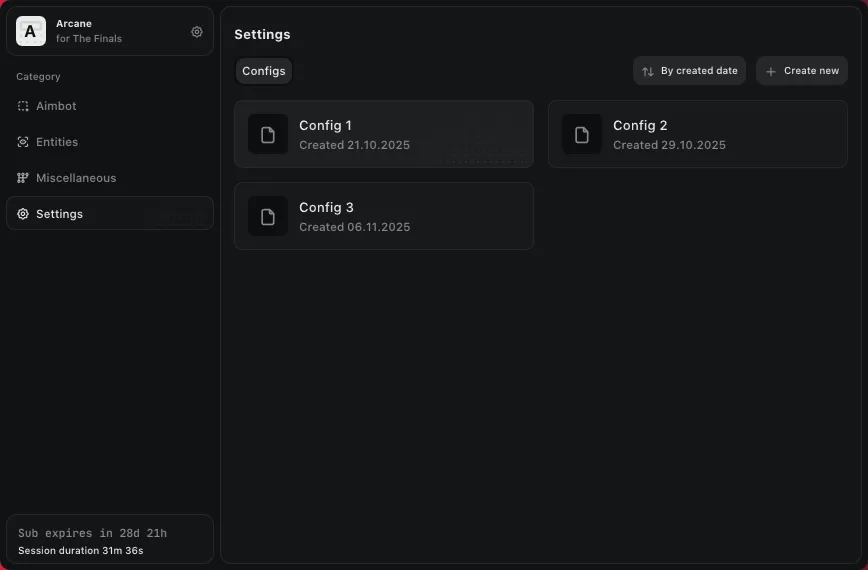
Arcane can save a configuration, assign menu and unload keybinds, change interface size through DPI scale, and select a theme or language. Save one arena setup with the preferred Aimbot FOV, smoothing and Player ESP distance, then reload it for another Cashout session without rebuilding each value by hand.
Fecurity Silent Aimbot
Hold a Cashout doorway with Fecurity Silent Aimbot and activate it through Aim at Shoot. The Finals visibility check keeps acquisition on exposed contestants, while enemy-only filtering excludes teammates crossing your firing lane. Choose a hitbox, draw the FOV boundary and set target-switch delay for the moment a second defender steps through the breach. Recoil Compensation steadies the burst on your selected opponent.
Fecurity Silent Aimbot →Fecurity Recoil Compensation
Fecurity recoil compensation works with Silent Aimbot. In a defence where enemies enter through a newly opened wall, it helps hold the selected opponent through repeated fire. For players choosing The Finals cheat for gunfights, it counters weapon movement during Aimbot use while normal ammunition, damage and reload remain in play.
Fecurity Recoil Compensation →Arcane Aimbot
Arcane Aimbot offers two keybind slots and an always-on state. Player, bot and teammate filters determine which contestants remain eligible for targeting. It can find a selected, closest or random bone, with head, neck, body and pelvis available. The Finals Aimbot FOV sets the acquisition area, while smoothness changes Aimbot movement and maximum distance limits eligible opponents.
Arcane Aimbot →Arcane Player ESP
Arcane Player ESP draws Box or Corner boundaries with static or gradient fill. It can add skeleton thickness, a head circle, line position, health, view line, name and distance. Switches for bots and teammates help separate a friendly crossing the Cashout room from an opponent entering through newly destroyed cover.
Arcane Player ESP →Health and Skeleton ESP
Fecurity and Arcane both provide Finals Health ESP and Finals Skeleton ESP. Fecurity uses them in a short enemy-only view with maximum distance. Arcane adds health styles, skeleton thickness, head circles, visibility checking and separate bot or teammate overlays. A deposit defence with several teams benefits most from the level of separation you prefer.
Health and Skeleton ESP →Arcane Radar
The Finals Radar on Arcane includes distance display, zoom, size and X or Y screen-position settings. During a Cashout defence, place the top-down view where it stays readable while the main camera holds a doorway. Movement around the station can then expose a team circling to stairs or approaching through a newly opened wall.
Arcane Radar →Arcane Item ESP
The Finals Item ESP belongs to Arcane and marks objects in the arena alongside Player ESP and Radar. Use the object markers while moving between rooms after a fight, then keep Player ESP visible as your team approaches the next vault. Radar shows contestant movement around the route while Item ESP remains focused on arena objects.
Arcane Item ESP →Visibility and Team Filters
The Finals wallhack uses Player ESP to show contestants through cover. Fecurity supplies boxes, health and skeletons, while Arcane adds names, distance and view lines. Use visibility checks for exposed targets and the team filters to separate allies from opponents when destruction opens a new approach to the Cashout station.
Visibility and Team Filters →Camera FOV
Fecurity Camera FOV override changes the player camera, while its zero-to-fifteen-degree Aimbot FOV defines the Silent Aimbot acquisition circle. Arcane FOV size also belongs to Aimbot acquisition. Use camera FOV to see more of a tight Cashout room and Aimbot FOV to set which opponents are eligible inside that view.
Camera FOV →Use Aim and ESP Around Vaults and Cashout Stations
When approaching a vault, Player ESP can identify enemies already holding nearby angles. Fecurity gives a direct hostile-only view, while Arcane can include teammates and bots. Boxes locate bodies, skeletons show posture and health helps pick the damaged defender before your team starts the vault or commits to carrying it out. The Finals Player ESP makes that opening contact readable before the team commits to the vault.
During the carry to a cashout station, lines, distance and view direction on Arcane can show where an opponent is facing. Fecurity’s visible check and skeleton can instead keep the view concise. The Finals Aimbot then differs by purchase: Silent Aimbot with recoil compensation on Fecurity, or smoothed bone acquisition with two keybinds on Arcane. The Finals cheat can show the damaged defender before your team begins the steal.
While defending a deposit, destruction can remove a wall, floor or ceiling and create a new firing lane. The Finals hacks keep Player ESP attached to contestants as they move through the opening. Arcane Radar shows nearby movement around the station, while Fecurity maximum ESP distance can restrict overlays to the part of the arena under defence.
Late Cashout Steals and Three-Team Fights
For a late steal, Health ESP identifies a wounded defender and Skeleton ESP shows posture beside the station. Arcane name and distance overlays separate several contestants in the same room. On Fecurity, target-switch delay governs how quickly Silent Aimbot moves to another eligible enemy after the first defender falls.
Team-heavy fights need clear filtering. Fecurity enemy-only removes allies from its hostile view. Arcane can retain teammates in a separate overlay and adjust bot transparency. During a three-team collapse on one Cashout, either remove friendly bodies from the combat view or keep them visible so their approach can be read beside enemy movement. The Finals hacks keep enemy positions and friendly movement distinct during the collapse.
The Finals PC Requirements
Fecurity supports Windows 10 and Windows 11 on Intel and AMD processors, with Steam and Xbox PC named as launchers. Arcane supports Windows 10 and 11 with Intel and AMD processors. Check the launcher and processor details for the choice you want before using Silent Aimbot on Fecurity or Radar and smoothed Aimbot on Arcane.
Silent Aimbot, Smoothed Aim and Detailed ESP
Choose Fecurity for Silent Aimbot, visible and enemy checks, recoil compensation, target-switch delay, hitbox selection, boxes, health, skeletons and Camera FOV override. The Finals Fecurity fits a contestant holding a firing lane through repeated shots while hostile-only ESP tracks enemies entering the objective room.
Fecurity: Silent Aimbot and Recoil
Arcane: Radar, Item ESP and Smoothed Aim
The Finals Cheats FAQ
What does The Finals Arcane include?
Choose Arcane for regular Aimbot with smoothness, several bone-selection methods and maximum distance. The Finals Arcane also supplies detailed Player ESP, bot and teammate overlays, Radar, Item ESP and saved configurations. It fits a player who wants top-down movement around a Cashout alongside precise target and player display settings.
What does each cheat include?
The Finals cheats split into Fecurity and Arcane. Fecurity brings Silent Aimbot, recoil compensation, hostile Player ESP and Camera FOV override. Arcane brings smoothed Aimbot, extensive Player ESP, Radar and Item ESP. Both draw boxes, health and skeletons for contestants fighting around vaults, carries and Cashout stations.
How do Fecurity and Arcane Aimbot differ?
Fecurity aim is Silent Aimbot with aim-at-shoot, visible check, recoil compensation, target-switch delay, hitbox selection and a zero-to-fifteen-degree FOV. Arcane aim uses selectable bone logic, two keybinds, visibility check, FOV size, smoothness and maximum distance. Choose The Finals cheat whose aiming behaviour matches the way you fight.
Which cheat includes Radar and Item ESP?
Arcane includes Radar and Item ESP. Radar provides distance, zoom, size and screen-position settings for nearby player movement. Item ESP marks arena objects separately from contestants. Use Radar to follow movement around the station and Player ESP to identify the defender holding the doorway as your team rotates into the next room. Choose The Finals cheat from Arcane when you want Radar beside the main arena view.
Get The Finals Fecurity or Arcane
Fecurity supports Windows 10 and 11 on Intel and AMD processors through Steam and Xbox PC. Arcane supports Windows 10 and 11 on Intel and AMD processors. Choose Fecurity for Silent Aimbot and recoil compensation, or Arcane for smoothed Aimbot, detailed Player ESP, Radar and Item ESP around The Finals Cashout fights.
Explore more Cheats & Hacks
Explore our collection of premium cheats & hacks.