


ESHUB / Halloween: The Game / Guide
Finding Escape Routes With Halloween World ESP
Reaching a locked gate with Michael nearby is a bad time to discover you need another route. Halloween World ESP shows where an exit is and the state it is in, so you can check it before committing to the trip.
Internal, available in our Halloween cheats category, also shows useful objects around Haddonfield. You can find a fuse, locate a phone or check a power box while deciding how to get residents away from danger.
Finding an exit
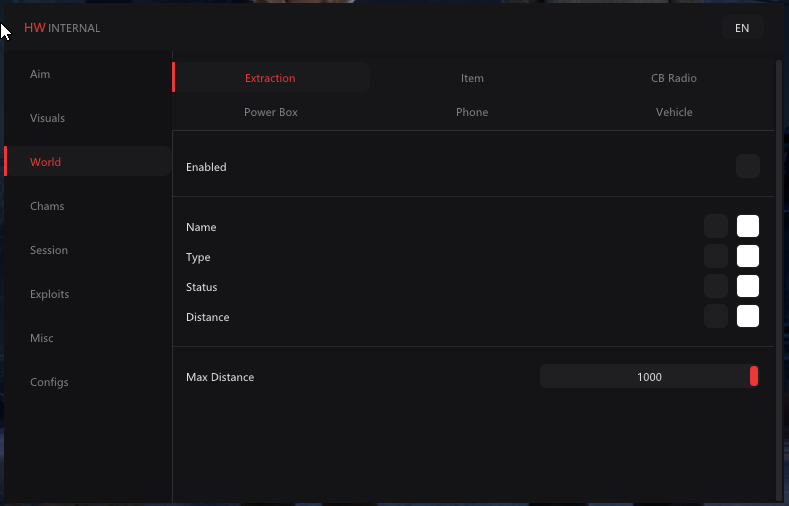
Extraction ESP draws the name and location of an exit. Look at the marker before leading residents towards it, then follow the street or entrance that reaches it. A point visible through a house may be on the far side of the building.
Extraction type tells you which kind of exit you have found. Gate and Hatch appear among the names shown in the cheat. Knowing the type gives you more to work with than heading towards the nearest marker without looking at it.
Escape locations can change between matches. Use the current round to plan where you are going rather than assuming the exit from the previous match is still there. Familiar streets help with the route, but the destination needs checking again.
Checking whether an exit is locked
Extraction status shows the state of the exit. If it is locked, finding it has not completed the actions needed to open it. Read that state while you still have room to change your plan.
You can then decide whether to work towards opening that exit or use another route. Keep Michael's position in mind if you also run player tracking. An exit you can reach is less useful when bringing residents there puts them directly in his path.
Choosing a route through Haddonfield
Extraction distance tells you how far the exit is from your position. The closest number is a useful starting point, but a fence or house may make the walk longer than it looks on the overlay.
Think about escape routes a turn at a time. Check the next street and the entrance you need to pass through. If Michael moves towards that part of the neighbourhood, you can change course before committing to the whole journey.
Moving residents makes that decision more important. You need a route they can follow, not just a point you can see through several buildings. Watch where the group is as well as where you want it to finish.
Finding a fuse, weapon or first aid kit
Item ESP shows the name of an object before you reach it. If you need a fuse, look for that item instead of visiting every room with a marker. The name helps you choose which stop is worth making.
Item type groups objects by their use. Medical, Weapon and Escape appear in the cheat's gameplay, so you can distinguish a first aid kit from a wood axe while deciding what you need next.
Item distance helps when more than one useful object is visible. Check how you would reach each one, particularly if the nearer marker sits behind a wall or on the other side of a house. The shortest straight distance does not describe every doorway on the route.
Items can also move between matches. Look for the current object instead of repeatedly returning to a room where it appeared before. That saves a detour when you are trying to prepare an escape.
Locating phones
Phone ESP helps you find a phone without searching each room first. Use the marker to locate the building, then check the entrance and the area around it before crossing towards the phone.
Phone status shows its current state. An Idle readout describes what the overlay is showing at that moment, rather than completing a call for you. You still interact with the phone in the game.
Phone type adds another detail when identifying the object. Keep the phone itself as your destination and follow what the game asks you to do once you reach it. A marker alone does not mean the call or objective has been completed.
Checking power boxes
Power Box ESP draws boxes around the neighbourhood so you can locate them while planning your route. That is useful when a task brings you towards a building you have not searched yet.
Power box status shows the current state, with On visible in the cheat's gameplay. Read it before walking over, then use the game's interaction at the box if you need to change anything. Seeing the state is separate from operating it.
The box and a nearby phone are different objects. Follow the marker for the one you need, especially when several drawings overlap around the same house. That keeps a quick check from turning into a visit to the wrong side of the building.
Finding CB radios
CB Radio ESP marks radios so you can locate them among the other objects nearby. Give the marker a place in your route when the radio is relevant to what you are doing, rather than treating every object as a necessary stop.
CB radio status adds the state shown by the overlay. Read it with the radio's location, then interact with the object in the game. The ESP helps you find and identify it without performing that interaction for you.
Identifying vehicles
Vehicle ESP shows where vehicles are, which is useful when checking a street before moving across it. The drawing can help you identify the object from a distance instead of walking up to each one first.
Vehicle type tells you what the marker represents. Read it before assuming a particular object is the one you need for your next action. Several nearby markers may refer to different objects on the same street.
Vehicle status gives another part of that check. A Parked state, shown in the cheat's gameplay, describes the vehicle's condition on the overlay. It does not by itself establish that the vehicle is ready to use as an escape.
Keeping the exit visible during a chase
When Michael closes in, you may need fewer object drawings around the route ahead. Internal lets you change the World ESP categories shown, and Combat Mode can disable selected categories with a keybind.
Keep the exit or item you actually need visible. If a search for a fuse turns into a chase, a screen full of unrelated objects can make that destination harder to follow. Set the categories around the task you are doing and save them when they work for you.
World ESP questions
Does ESP open an exit for me?
No. It shows the exit and its current state. You still need to complete the required actions in the game.
Will items be in the same place next match?
The game can change item and escape locations between matches. Use the current round's markers instead of relying on the previous route.
Can I see whether a power box is on?
The power box display includes its status. Read that state with its location before going over to interact with it.
Is the nearest exit always the quickest to reach?
Buildings and fences can make the route longer than the displayed distance suggests. Look at the path and Michael's position before choosing it.
Get Halloween World ESP at ESHUB
Our Halloween cheats category includes Internal with object and exit tracking. Find the destination, read its state and plan the route before bringing residents across the neighbourhood.