

ESHUB / Halloween: The Game / Guide
How Player ESP Works in Halloween: The Game
Michael disappears behind a house and you need to know whether he kept running or turned towards your street. Halloween Player ESP shows his position through the building, so you can follow the movement while deciding where to go next.
Our Halloween cheats include Internal with tracking for Michael and Civilian players. You can see who is nearby and follow them through the houses of Haddonfield without relying on the last glimpse you caught through a doorway.
Finding Michael with Player ESP
Michael ESP lets you follow his position while the scenery blocks your normal view. If he moves around the side of a house, you can watch which corner he approaches before stepping into the street yourself.
The route still matters. Seeing him a short distance away through a wall does not put him in the same room as you. Look at the doorway or path that connects your positions, particularly when you are moving towards residents who need help.
A stationary position can be useful too. If Michael stops beside the exit you intended to use, you have time to reconsider that route before bringing someone towards it. Keep watching in case he moves again while you approach.
Following Civilians through houses
Civilian ESP helps you keep track of a player who turns out of sight during a chase. Follow their movement past the wall rather than stopping at the last doorway where you saw them. That gives you a better starting point for choosing the next turn.
Player names help when several people pass through the same area. You can keep following the person you were watching as another crosses nearby. Their location may change quickly, so use the name with their movement rather than treating one position as permanent.
This page covers player tracking. Resident NPCs have a different role in the match, and a separate resident ESP feature is not established by the player controls described here.
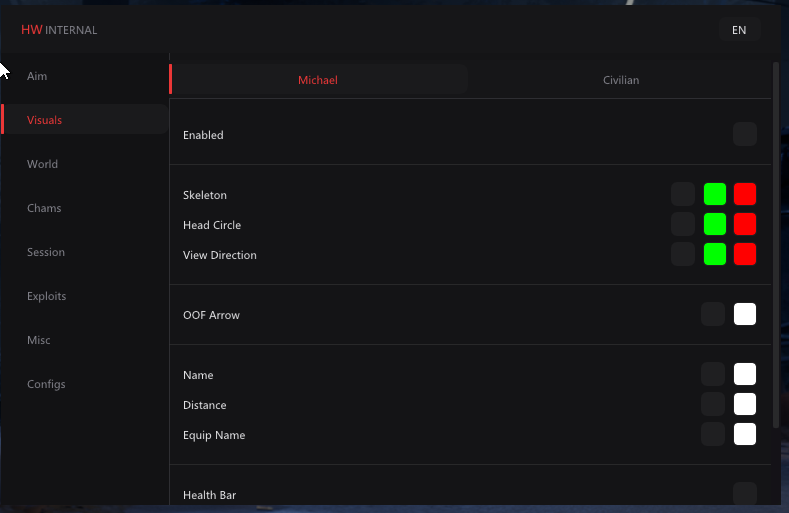
Skeletons and head circles
Skeleton ESP draws the player's body through its joint positions. During a chase, that makes the movement easier to follow as the person turns through a doorway or changes direction inside a house.
Head Circle marks the head with a circle. It can give you a smaller point to follow if the full body drawing is more than you want. You can judge the movement against the room or street while keeping track of the same player.
Neither drawing aims for you. They show the person on the screen, while Internal's Aimbot controls aiming separately. Choose the drawings for the part of the chase you need to follow.
Seeing where a player is facing
View Direction shows which way a player faces. That matters when Michael is standing near the street you want to cross, or when a Civilian turns at a doorway and you need to follow the next movement.
Off Screen Arrow points towards a player outside your current view. Use it to turn the camera back towards them, then check where they are in relation to the house or fence between you. The arrow gives a direction, not a walking route through the scenery.
During a quick turn, these two drawings answer different questions. One helps you face the player again. The other helps you see where that player is looking once you have brought them back into view.
Checking health and equipment
Player health gives you context before approaching someone. A Civilian who has already taken damage presents a different situation from one arriving untouched. Look at the player and the people nearby before committing to the confrontation.
Equipment names show what a player is carrying. If you can see an item in their hands, the text helps identify it while you are still moving. That is more useful than waiting until you are beside them to work out what they have.
Player distance helps you judge who is close enough to affect your next action. Remember that the number measures separation, while the route may go around a house. Use the street and entrances to work out how the two positions connect.
Colours for players behind walls
You can set separate colours for visible players and those obscured by the scenery. Choose shades that are easy to tell apart in dark interiors, so you can recognise the difference without stopping to inspect the colour.
Hidden players can remain drawn while their bodies are behind a wall. That is useful when a chase moves from the street into a house. Keep watching where the drawing moves, then approach through the actual entrance.
Once you have chosen colours you recognise, keep them consistent for a while. Changing their meaning every session makes it harder to react when Michael briefly passes behind the building you are approaching.
Highlighting players with Chams
Halloween Chams colour the player's body, giving you a fuller shape to follow than a skeleton. Internal includes a visibility check and separate colours for people in view or behind cover.
Solid Chams use a consistent highlight. A colour that stands out against the interior of a house can make it easier to follow the body as it passes from one room into another. Judge it against the locations where you normally lose sight of a chase.
RGB Chams provide a changing colour effect. Use them if you prefer that appearance, but keep watching the player's movement. A different colour effect does not change the route someone is taking around you.
Limiting how far ESP shows players
Maximum distance controls how far the overlay draws players. A nearby chase may only need the people around the next house, while moving between streets can call for a wider view of the players in the area.
Set the range around the action you are taking. If distant names make the person in front of you harder to follow, reduce the range. You can increase it again when you need to plan movement across a larger part of the map.
Hiding ESP during a fight
Combat Mode disables selected ESP categories through a keybind. It is useful when you move from looking for objectives to dealing with a player at close range and want fewer objects drawn around the fight.
Choose the categories you want hidden before you need the keybind. You can keep the player drawing you use during a chase while reducing other text. Save the configuration once you have a layout you can recognise quickly.
Player ESP questions
Can I see Michael through a wall?
Player ESP can show his position while a building blocks your normal view. You still need to follow the entrances and paths to reach or avoid him.
Does the skeleton aim at players?
The skeleton draws the body so you can follow it. Aimbot is a separate feature with its own targeting controls.
Can I tell whether someone is behind cover?
Separate visible and hidden colours let you distinguish those states. Choose colours that remain easy to recognise inside dark houses.
Can I turn off some ESP with a key?
Combat Mode has a keybind and can disable selected categories. Set those categories in advance so the key hides the drawings you intend.
Halloween Internal at ESHUB
Find Internal in our Halloween cheats category for Michael and Civilian tracking alongside Chams. Start with the player drawing you find easiest to follow, then add the details you use during a chase.